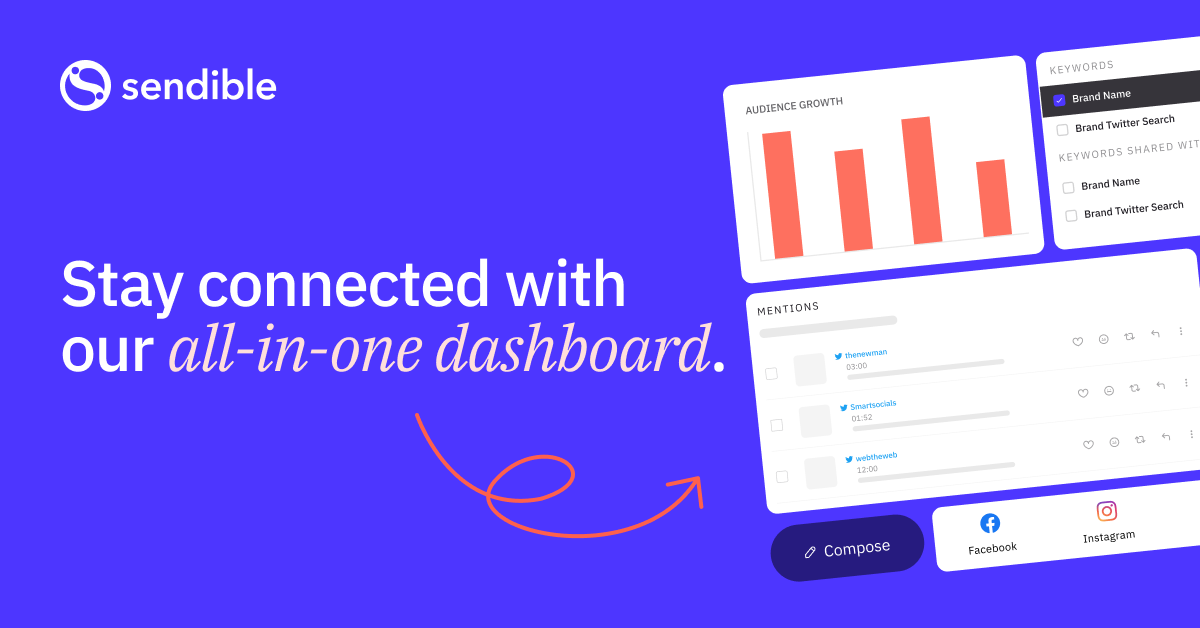
What if you could manage all your social media accounts from one powerful platform? Imagine saving hours each week while boosting your engagement and results.
This comprehensive social media management tool helps businesses and agencies streamline their workflow. It gives you everything needed to handle multiple clients and campaigns in one place.
Over 30,000 users trust this platform for their social media marketing needs. It’s particularly popular with marketing teams and agencies.
The system offers white label branding and advanced reporting tools. You get custom user roles, approval workflows, and seamless team collaboration features.
From scheduling posts to monitoring engagement, this all-in-one solution covers every aspect of social media management. It works for freelancers, small businesses, and large enterprises alike.
Key Takeaways
- Manage multiple social profiles and clients from a single dashboard
- Advanced features include white-label options and custom reporting
- Streamline team collaboration with approval workflows
- Schedule content across all major social media platforms
- Trusted by over 30,000 users worldwide
- Suitable for businesses of all sizes and marketing agencies
- Comprehensive tool that handles scheduling, monitoring, and analytics
What is Sendible? An Overview
Founded in 2008, this platform has maintained a customer-first approach while focusing on essential social media management needs. It delivers a comprehensive solution for handling multiple accounts and campaigns.
The system connects with all major social media platforms including Facebook, Instagram, and Twitter. It also works with LinkedIn, Google Business, YouTube, TikTok, and WordPress blogs.
This versatile media management tool serves businesses of all sizes. Freelancers, small teams, and large agencies all benefit from its streamlined workflow.
The platform avoids unnecessary features that drive up costs. You won’t find expensive add-ons like sentiment analysis or reputation management. This keeps pricing competitive while delivering core functionality.
Users can easily complement the system with specialist tools if needed. The focus remains on essential social media marketing tasks rather than bloated features.
Team collaboration features help multiple team members work together efficiently. The platform supports custom user roles and approval workflows for smooth operations.
From scheduling posts to monitoring engagement, this tool covers all bases. It’s designed to save time while improving your social media presence across all platforms.
Key Features of Sendible
Effective social media management hinges on having the right tools to schedule, monitor, and analyze your digital presence. This platform delivers a comprehensive suite of features that address common challenges faced by marketing teams and agencies.
Publishing and Scheduling Tools
The content calendar provides a visual overview of your publishing schedule across all connected accounts. You can schedule posts in advance with precise timing options.
Content queues automatically fill gaps in your posting schedule with pre-approved content. This ensures consistent engagement without daily manual intervention.
Integrations with Canva and Pexels streamline content creation. You can access stock images and design tools directly within the platform.
Bulk scheduling allows importing multiple posts via CSV files. This saves significant time when planning content campaigns across various social profiles.
Unified Social Inbox and Engagement Monitoring
The Priority Inbox consolidates messages and mentions from all connected accounts. Sentiment analysis helps identify urgent customer service issues.
Social Feeds provide real-time updates from your networks. You can quickly respond to comments and engage with your audience directly.
This unified approach eliminates the need to switch between different apps. Everything happens within a single, organized interface.
Advanced Reporting and Analytics
Automated email reports keep stakeholders informed without manual effort. These can be scheduled and customized for different audience needs.
The custom report builder offers over 250 modules for detailed analysis. You can create platform-specific insights tailored to your business goals.
Performance metrics help optimize your social media strategy over time. Track what works and adjust your approach based on concrete data.
Note that Twitter/X analytics are limited due to recent API changes. The platform also doesn’t currently support Pinterest or Twitch integrations.
Team Collaboration and White Label Options
Custom user roles and permissions ensure appropriate access levels for team members. Approval workflows maintain content quality across your organization.
Task management features help distribute work efficiently among your team. You can assign responsibilities and track progress within the platform.
White-label branding options are particularly valuable for agencies. You can present the entire platform under your own brand to clients.
Mobile apps for iOS and Android enable on-the-go management. Stay connected and responsive even when away from your desk.
Setting Up Sendible: A Step-by-Step Guide
Getting started with this social media management platform takes just minutes. The intuitive setup process guides you through each essential step.
New users receive a helpful guided tour upon first login. Interactive tooltips explain key features and navigation throughout the dashboard.
Begin by connecting your social profiles through the Profiles app. The platform supports all major networks including Facebook, Instagram, and Twitter.
You can also link LinkedIn, Google Business, YouTube, and TikTok accounts. Each connection follows secure authorization protocols for account safety.
Organize your connected profiles into custom lists for efficient management. This grouping enables bulk scheduling across multiple accounts simultaneously.
The Publishing app serves as your central content creation hub. Compose posts with text, images, and hashtags for optimal engagement.
Schedule content using the visual calendar interface or automated queues. Set specific posting times across different time zones for global audiences.
Enhance your media posts with integrated design tools. Access Canva, Pexels, GIPHY, and Flickr directly within the composer.
Install the Chrome extension for quick content sharing from web pages. This tool captures online content and converts it into scheduled posts instantly.
Configure your account settings in the preferences menu. Set time zones, notification preferences, and default posting options for streamlined workflow.
Add team members through the collaboration settings panel. Assign custom permissions based on role requirements and security needs.
Establish approval workflows to maintain content quality control. Senior team members can review scheduled posts before publication.
The entire setup process focuses on practical social media marketing needs. You’ll be managing accounts efficiently within your first hour.
Pricing and Plans: Is Sendible Affordable?
Finding the right balance between features and cost is essential when choosing a social media platform. This media management tool offers transparent pricing tiers designed for different business needs.
All plans include unlimited scheduling and basic reporting. You also get access to the unified inbox for monitoring messages across platforms.
Creator Plan
The Creator plan costs $29 per month. It supports one user and six social profiles.
This tier works well for freelancers and solo entrepreneurs. You get unlimited post scheduling and basic analytics.
The plan includes monitoring tools and simple reports. It covers essential social media management needs without advanced features.
Traction Plan
The Traction plan is priced at $89 monthly. It allows four users and twenty-four social profiles.
This option suits small teams and startups perfectly. Team collaboration features become available at this level.
You gain approval workflows and client dashboards. The platform supports more sophisticated media marketing strategies.
White Label and Custom Plans
White Label plans start at $240 per month. They include twenty users and sixty social profiles.
This tier targets marketing agencies and larger teams. White-label branding options are a key advantage here.
You can customize the platform with your own branding. Custom domains and advanced reporting come standard.
Additional plans include Scale ($199/month) and Expansion ($399/month). These offer more users, profiles, and advanced tools.
Scale provides seven users and forty-nine profiles. Expansion supports fifteen users and one hundred five profiles.
Higher tiers include content libraries and Bitly integration. Automated reporting and account management features expand significantly.
Custom plans are available for enterprise clients. They offer unlimited users and single sign-on capabilities.
All plans qualify for a 15% discount with annual billing. A 14-day free trial lets you test the platform risk-free.
Compared to competitors like Sprout Social, this media management tool offers competitive pricing. The value becomes apparent for teams managing multiple clients.
Key features like content libraries are limited to higher-tier plans. Advanced reporting tools also require premium subscriptions.
Evaluate your team size and social profile needs carefully. The free trial helps determine the right plan before committing.
Take advantage of the trial period to explore all features. This ensures the platform meets your specific media marketing requirements.
Pros of Using Sendible
The right media management tool delivers significant benefits that transform how businesses handle their online presence. This platform stands out with features that streamline workflow and boost productivity.
All essential functions reside in one intuitive interface. You get scheduling, monitoring, reporting, and engagement tools without switching between apps. This unified approach saves valuable time for social media managers.
New users appreciate the straightforward design that requires minimal training. The clean layout makes navigation simple even for beginners in social media marketing.
Unlimited post scheduling comes with every pricing plan. This offers exceptional value for businesses that maintain active social media presence across multiple platforms.
Team collaboration features excel for agencies and marketing teams. Custom user roles and approval workflows ensure smooth operations among team members.
White label options let agencies present the platform under their own branding. This professional touch enhances client relationships and brand consistency.
Advanced reporting tools provide deep insights into campaign performance. The custom report builder offers over 250 modules for detailed analysis.
Automated PDF reports keep clients informed without manual effort. These scheduled reports demonstrate value and transparency in media management.
Mobile apps for iOS and Android enable on-the-go management. Stay responsive to messages and monitor accounts from anywhere at any time.
The platform offers remarkable affordability compared to competitors. Similar features cost nearly ten times more with other social media management tools.
An AI writing assistant accelerates content creation for media posts. While it doesn’t tailor messages for specific platforms, it significantly speeds up the writing process.
Bulk scheduling capabilities handle multiple social profiles efficiently. This feature is perfect for managing numerous client accounts or business pages.
The priority inbox consolidates messages from all connected accounts. This centralized communication hub prevents missed opportunities for engagement.
From the Creator plan to custom enterprise solutions, the platform scales with your needs. Each tier provides appropriate tools for different business sizes.
These advantages make the platform a smart choice for effective social media management. The comprehensive feature set delivers tangible results for businesses of all scales.
Cons of Using Sendible
While Sendible offers robust features, certain limitations deserve consideration before committing. Understanding these constraints helps businesses make informed decisions about their social media management needs.
Key features remain locked behind higher pricing tiers. The content library and advanced reporting tools require premium plans. Budget-conscious users may find this restrictive for their media management needs.
Twitter integration faces significant limitations due to API changes. You can schedule posts but cannot reply to messages or access analytics. This reduces functionality for teams focused on that platform.
Pinterest and Twitch integrations are completely absent from the platform. Businesses relying on these social media platforms must seek alternative management tools.
The user interface presents a learning curve for new team members. Some users report the dashboard feels clunky compared to simpler media management tools.
Image editing capabilities are quite basic within the platform. You get minimal customization options compared to dedicated design tools.
Instagram Collaboration posts and TikTok Carousels lack direct scheduling support. Social media managers must use workarounds for these specific content formats.
Pricing may challenge small businesses with limited budgets. The Creator plan starts at $29 monthly but offers limited social profiles.
Priority support options are not available across any plan tier. Response times may vary when urgent account issues arise.
These limitations balance against the platform’s comprehensive feature set. Businesses should evaluate whether these constraints impact their specific social media marketing workflow.
Sendible Alternatives: How Does It Compare?
Exploring other options helps you find the perfect social media management solution. Different tools offer unique strengths for various business needs.
Some platforms focus on specific networks or budget requirements. Others provide advanced features at competitive pricing.
Pallyy
Pallyy specializes in Instagram and TikTok management. It offers powerful visual planning tools for these platforms.
The Instagram feed planner helps you maintain aesthetic consistency. A built-in link-in-bio tool drives traffic from your social profiles.
Pallyy’s pricing starts at just $18 per month. This makes it an affordable alternative for content creators.
You get scheduling, analytics, and a unified inbox. The platform focuses on visual social media platforms.
SocialBee
SocialBee serves as a comprehensive social media management platform. It supports Pinterest, which Sendible currently lacks.
The AI caption generator creates engaging content quickly. This feature enhances your media posts without extra effort.
Pricing begins at $29 monthly, matching Sendible’s entry plan. You receive additional AI capabilities at this level.
SocialBee offers excellent value for all-in-one management. It covers multiple media platforms with smart automation.
SocialPilot
SocialPilot delivers strong value for small businesses and agencies. It provides unlimited client collaboration features.
White-label reports maintain brand consistency for your team. The intuitive calendar simplifies content scheduling.
Advanced features come at lower costs compared to other tools. You avoid tiered restrictions on posting limits.
Canva integration enhances your media creation workflow. This management tool supports efficient team collaboration.
Each alternative addresses different pain points in social media marketing. Pallyy excels for visual platforms, while SocialBee offers broader platform support.
SocialPilot provides exceptional value for agencies managing multiple clients. Consider these options if you need specific features Sendible doesn’t offer.
Your choice depends on required platforms, team size, and budget. Evaluate each tool’s strengths against your social media management needs.
Who Should Use Sendible?
Different businesses need different social media management solutions. This platform serves various organizations with its comprehensive features.
Marketing agencies benefit most from the white label options. They can present the entire platform under their own branding.
Team collaboration features make it ideal for growing agencies. Custom user roles and approval workflows streamline operations.
Freelancers find value in the Creator plan. It offers unlimited scheduling for six social profiles at $29 monthly.
Small businesses appreciate the unified dashboard. They manage all their social media posts from one interface.
Growing teams should consider the Traction plan. It supports four users and twenty-four social profiles.
This plan includes client dashboards and advanced reporting. These tools help agencies demonstrate value to clients.
Enterprises can opt for custom plans with unlimited users. Single sign-on capabilities enhance security for large teams.
The platform excels for those prioritizing all-in-one functionality. It covers scheduling, monitoring, and reporting without niche extras.
Evaluate your team size and social profile needs carefully. Match your requirements with the appropriate pricing plan.
Consider your need for white label branding and team features. These elements determine which plan delivers the best value.
The 14-day free trial helps assess the platform’s fit. Test all features before making a commitment.
This social media management tool serves businesses focused on results. It provides the essential tools for effective online presence.
Final Verdict: Is Sendible Worth It?
After thorough evaluation, this social media management platform proves its value for teams and agencies. It delivers powerful tools at competitive pricing.
The all-in-one functionality stands out as its greatest strength. You get scheduling, monitoring, and reporting in a single dashboard. This eliminates switching between multiple apps.
Unlimited post scheduling works across all pricing tiers. Even the basic Creator plan offers this valuable feature.
Team collaboration tools make it ideal for growing agencies. Custom user roles and approval workflows streamline operations.
White label options let agencies present the platform under their branding. This professional touch enhances client relationships.
Advanced reporting provides deep insights into campaign performance. Automated PDF reports keep clients informed without extra work.
Some limitations deserve consideration. Key features remain locked behind higher pricing plans.
Twitter analytics face restrictions due to API changes. Pinterest and Twitch integrations are completely absent.
Despite these constraints, the platform offers exceptional value. It focuses on core social media marketing needs without bloated features.
Compared to competitors, this media management tool provides similar capabilities at lower costs. The 14-day free trial lets you test all features risk-free.
We recommend this solution for teams prioritizing practical functionality. It delivers everything needed for effective online presence management.
Try the platform if you manage multiple clients or social profiles. The investment pays off through time savings and improved results.
Conclusion
Sendible delivers a complete social media management solution. It handles scheduling, engagement, and reporting in one place.
This platform suits mid-sized businesses and agencies best. Features like white label options and team collaboration tools add great value.
While it has some limits, its strengths stand out. The Creator plan offers a solid start for smaller teams.
Assess your needs against what Sendible offers. Use the 14-day free trial to test it yourself.
For those wanting an affordable, all-in-one tool, it’s a smart pick. Start optimizing your social media strategy today.
FAQ
What social platforms does Sendible support?
Sendible supports all major social platforms including Facebook, Instagram, Twitter, LinkedIn, YouTube, and Pinterest. It also integrates with Google My Business and blogging platforms like WordPress and Medium.
Can I manage multiple accounts from one dashboard?
Yes, you can manage multiple social profiles and accounts from a single, unified dashboard. This makes it easy to handle clients or different brands without switching between tools.
Does Sendible offer a free plan?
A> Sendible does not have a free plan, but it offers a 14-day free trial for all new users. This allows you to test all features before committing to a paid subscription.
How does the bulk scheduling feature work?
The bulk scheduling tool lets you upload and schedule multiple posts at once using a CSV file. This is ideal for planning content in advance and maintaining a consistent posting schedule.
Is there a mobile app available?
Yes, Sendible provides a mobile app for both iOS and Android devices. You can manage posts, engage with your audience, and view reports on the go.
Can I collaborate with my team on Sendible?
Absolutely. Sendible includes team collaboration features such as user roles, approval workflows, and task assignments. This ensures smooth coordination among team members.
What kind of reports can I generate?
You can create custom reports that track engagement, follower growth, post performance, and more. These reports can be white-labeled and automatically sent to clients.
Does Sendible support white-labeling?
Yes, white-labeling is available on higher-tier plans. This allows agencies to rebrand the dashboard and reports with their own logo and company details.
How does the unified inbox work?
The unified inbox aggregates messages, comments, and mentions from all connected social profiles into one stream. You can respond directly and assign conversations to team members.
What customer support options are available?
A> Sendible offers support via email and live chat. Higher plans include priority support for faster response times and dedicated assistance.