What if you could access hundreds of premium Mac applications without buying each one separately?
This question gets to the heart of modern software consumption. Many users feel overwhelmed by individual app purchases and subscriptions.
A new type of subscription service has emerged to address this challenge. Instead of visiting multiple app stores, you get a curated collection of tools.
These platforms offer a flat monthly fee for access to numerous applications. The promise is simple: save money and time while discovering useful software.
This comprehensive review examines whether such services deliver real value. We’ll look at the variety of tools available, from utility apps like Bartender to creative software.
You’ll get clear information on pricing plans and how they work. We’ll help you decide if this approach fits your needs.
Key Takeaways
- SetApp provides access to over 240 Mac applications through one subscription.
- The service aims to simplify finding and using productivity tools.
- Users pay a single monthly fee instead of multiple individual subscriptions.
- The platform offers different plans for individuals, families, and teams.
- Real user experiences show both time savings and potential limitations.
- The value depends on how many apps from the collection you actually use.
- Comparing SetApp to buying apps separately helps determine cost-effectiveness.
What is SetApp? A New Model for Software Access
Imagine a single key that unlocks a vast toolbox of premium software. This is the core idea behind a modern subscription service that is changing how people get their apps. It moves away from the hassle of buying programs one by one.
This model offers a flat monthly price for unlimited use of a whole library. You can think of it like a streaming service, but for productivity and utility tools. It simplifies the entire process of finding, trying, and using new software.
Beyond the Traditional App Store
The standard way to get software involves visiting an official store. You browse, buy a license, and manage updates yourself. This service offers a different path.
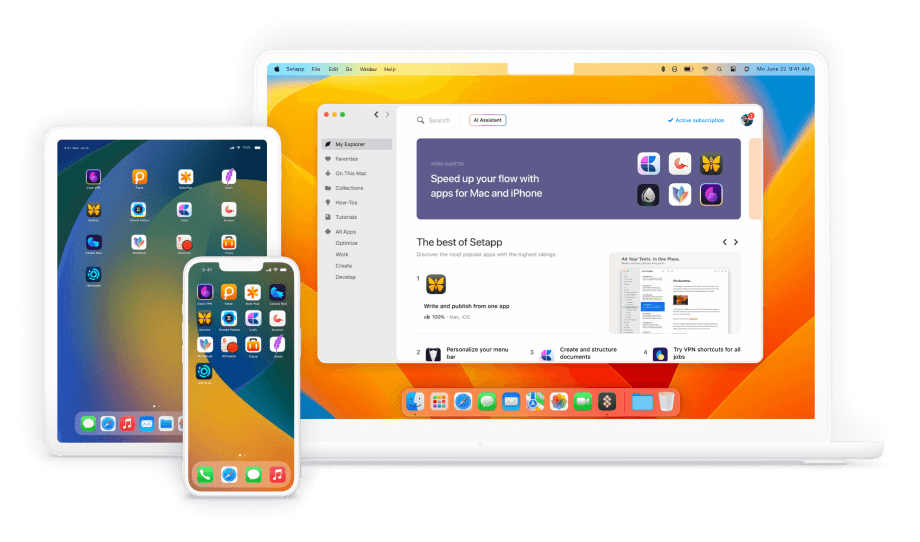
It provides its own desktop client. This acts as a private, curated store for its members. Here, you can download any app from the catalog instantly.
The company behind it, MacPaw, launched this platform in 2017. It has grown to include hundreds of applications. The goal is to cut through the clutter of the mainstream store.
The Subscription-as-a-Bundle Concept
Instead of many separate subscriptions, you pay one fee. This covers all the apps in the collection. It’s a simple way to manage software costs.
Developers are paid based on how much users engage with their apps. This is different from traditional stores. It aligns developer success with user satisfaction.
The service requires macOS 11 or later to run. A free trial is available to test everything risk-free. This lets you see if the bundle saves you time and money.
Ultimately, it represents a shift in software access. It turns individual purchases into a shared, managed resource. For the right user, it can be a powerful upgrade to their workflow.
The Core Promise: Unlocking Value for Power Users
Power users face a constant dilemma: pay for each premium tool separately or find a smarter solution. The subscription bundle model answers this with a straightforward proposition. It offers significant value through two main channels.
First is the potential for real cost savings. Second is the convenience of a unified software platform. Both factors work together to enhance productivity.
Cost Savings vs. Individual Subscriptions
Let’s address the pricing directly. The standard monthly fee is $9.99 for Mac access alone. Adding iOS apps increases this to $12.49 per month.
Even with an annual plan, you pay at least $108 yearly before taxes. This seems like a substantial commitment. However, individual app subscriptions add up quickly.
Many included tools have their own standalone pricing. For example, Ulysses costs $5.99 monthly by itself. Session runs about $4.99 per month.
Subscribing to just these two apps nearly matches the entire bundle price. Add other popular utilities like Bartender or CleanMyMac X. The savings become immediately apparent.
The platform delivers exceptional value for users of expensive professional software. Tools like Luminar Neo cost $179 annually on their own. Getting them within the bundle changes the math completely.
The Convenience of a Unified Platform
Beyond pure cost, the service offers tremendous workflow benefits. Managing dozens of individual subscriptions creates administrative headaches. You must track various renewal dates and payment methods.
The bundle consolidates everything into one account. This eliminates the clutter of multiple billing cycles. You gain a single point of control for all your tools.
The unified platform simplifies discovery and experimentation. Users can try new applications without additional financial risk. This reduces decision fatigue about software purchases.
You encounter tools you might never have found otherwise. The collection acts as a curated software library. It expands your capabilities across different projects.
Installation and updates happen through one central client. There’s no need to visit multiple developer websites. Everything stays current automatically.
This convenience factor saves both time and mental energy. For power users who value efficiency, this is often the deciding factor. The combined value of savings and simplicity creates a compelling package.
The SetApp Library: Quality and Variety
The true test of any software subscription lies in the depth and quality of its available tools. This platform delivers a collection exceeding 240 applications. The range spans productivity, utility, creativity, and development categories.
Careful curation ensures each app meets high standards. Many represent best-in-class solutions for specific tasks. This approach saves users the time spent hunting for reliable software.
Top-Tier Productivity and Utility Apps
Productivity tools form the backbone of this service. You’ll find excellent to-do list applications and calendar options. A premier email client is also included for managing communications.
The collection features what many consider the absolute best Pomodoro timer. This helps people maintain focus during work sessions. Note-taking apps like Craft provide versatile organization for ideas and projects.
Utility applications address common Mac needs effectively. System monitoring tools give real-time information about your devices. Menu bar management solves a persistent user interface challenge.
These utility apps demonstrate practical problem-solving. They enhance the Mac experience without complicated setup. The value comes from having these tools ready in one account.
Creative and Development Tools
Creative professionals gain access to powerful software. This includes one of the best AI photo editors available today. Such tools typically carry a high individual price tag.
Mind mapping applications help visualize complex concepts. They’re useful for planning projects or organizing thoughts. The creative suite supports various artistic and design workflows.
Development tools cater to programmers and technical users. Specialized applications streamline coding and debugging processes. These utilities often appeal to a niche but dedicated audience.
The inclusion of development software expands the platform’s appeal. It shows commitment to serving diverse professional needs. This variety strengthens the overall value proposition.
Spotlight on Must-Have Apps: Ulysses, Bartender, CleanMyMac X
Certain applications deserve special attention for their excellence. Ulysses stands out as arguably the best Markdown writing app for Mac. Writers and professionals favor its clean interface and powerful features.
Bartender solves a common frustration by organizing your menu bar. It declutters the top of your screen in a smart way. This utility improves daily workflow for many Mac users.
CleanMyMac X provides comprehensive system maintenance capabilities. It’s developed by the parent company behind this subscription service. The app effectively clears disk space and optimizes performance.
These three examples showcase the caliber of available software. Each addresses a specific need with a polished solution. Discovering such gems justifies the monthly subscription price for many subscribers.
The library continues evolving with new additions over the years. However, some users report occasional app removals from the catalog. This potential for change is worth considering during your free trial period.
Pricing and Subscription Plans: Finding the Right Fit
Choosing the right subscription tier requires understanding your specific device ecosystem and software needs. The service structures its offerings to match different user profiles. Each plan unlocks a different level of access to the application library.
Your decision impacts both monthly costs and the utility you receive. We’ll break down each option to help you find the best match. This information comes directly from the company’s current pricing structure.
Mac-Only Plan: The Standard Entry Point
The basic package starts at $9.99 per month. This covers unlimited use of all Mac applications on one computer. It represents the most straightforward way to join the platform.
This plan makes sense if you work primarily from a single Mac. You gain full access to the entire catalog of desktop software. Popular tools like Bartender and Ulysses are included.
Annual billing reduces your effective cost. Paying yearly saves approximately 16% compared to monthly payments. This discount makes the long-term commitment more attractive for regular users.
Mac + iOS Bundle: Expanding to Mobile
For $12.99 monthly, you add iOS support to your subscription. This plan works on one Mac and up to four iOS devices. It expands your access to include mobile applications.
The mobile catalog includes around 40 optimized apps. These complement the desktop experience for users on the go. Having synchronized tools across devices enhances productivity.
This tier offers strong value for people who use both Apple ecosystems. The small price increase unlocks significant additional functionality. It’s a logical upgrade for many modern professionals.
Power User and Family Plans: For Teams and Households
Individuals with multiple machines should consider the Power User option. At $14.99 per month, it supports four Macs and four iOS devices. This accommodates complex personal setups seamlessly.
The Family plan costs $19.99 monthly for up to four users. Each member gets their own separate account. Documentation regarding device limits per person remains unclear.
Both multi-user options provide excellent per-person value. They eliminate the need for separate individual subscriptions. Sharing costs across a household or team makes financial sense.
Educational discounts exist for students and teachers. Specific terms have changed over the years. Contact support directly for current eligibility requirements.
Billing occurs through Paddle as the Merchant of Record. This can create complications with international VAT and payments. Some users report issues with legacy plan grandfathering when changing billing cycles.
Always evaluate your actual device usage before selecting a plan. The right choice maximizes value while minimizing unnecessary expense. Start with the free trial to test compatibility with your workflow.
User Experience and Platform Functionality
Beyond the price tag, the actual user experience reveals whether a service delivers on its promises. How software feels when you install and use it daily matters more than marketing claims.
The platform’s interface and reliability directly impact your productivity. A smooth process saves time and reduces frustration.
The SetApp Desktop Client: Installation and Management
The desktop client provides a clean, App Store-like interface. You can browse available tools in a well-organized catalog.
Installation happens with a single click through this client. Updates are handled automatically in the background.
This ensures you always have the latest version of each app. The management screen lets you toggle installations easily.
You get quick access to tutorials and help guides. Discovery features recommend new applications based on your usage.
The system helps people find software they might otherwise miss. This curated approach simplifies the search process.
For many users, this centralized management is a major benefit. It eliminates visiting multiple developer websites.
Potential Drawbacks: The SetApp Folder and Offline Access
Installation places all applications in a dedicated SetApp folder. This organizational choice initially throws some people for a bit of a curveball.
Your Applications directory contains this special folder. All software from the service lives inside it.
A significant issue involves iOS app licensing. The implementation requires constant internet connectivity.
Want to use your apps on a plane? Forget it. The system fails completely in offline scenarios.
Desktop applications generally function offline after initial authentication. Some users report occasional re-authentication prompts though.
The licensing system can be unforgiving with minor billing hiccups. Access may revoke immediately without a grace period.
Technical issues sometimes occur after installation. These include apps crashing or system instability.
Conflicts with other software can also happen. The experience varies between macOS and iOS devices.
Mac users typically report positive experiences. iOS users frequently criticize reliability problems.
Always test everything during the free trial period. This gives you real information about how the tools work for you.
Consider your need for offline access before committing. The subscription price should match the functionality you actually receive.
Customer Support and Service: A Mixed Bag
The effectiveness of support determines whether users feel valued or frustrated with a service. Customer experiences with this platform show extreme variation.
Some people receive excellent help within hours. Others wait weeks without any response at all.
Reports of Responsive and Helpful Assistance
Positive feedback highlights friendly and knowledgeable representatives. These agents quickly resolve account and technical issues.
Some users describe responsive help during initial sign-up. This includes educational discount verification and plan changes.
The support team uses Zendesk ticketing for communication. Many tickets get closed with satisfactory solutions.
For basic questions about billing or software access, responses can be prompt. This creates a good first impression for new subscribers.
Common Criticisms: Inconsistency and Resolution Delays
Negative experiences form a contrasting picture. Long response times frustrate many customers.
Some report tickets closed without real resolution. Generic, unhelpful replies fail to address specific problems.
Billing issues represent a major pain point. Users mention incorrect charges and refund difficulties.
The company has faced accusations of censoring critical reviews. This concerns feedback on their own developed applications.
One long-term customer expressed shock at declining service quality. They contacted support twice via online form and social media.
No response came for over a month. This inconsistency mirrors growing pains in scaling subscription services.
Support agents sometimes lack knowledge about iOS app functionality. Licensing system limitations confuse both users and staff.
Responsiveness appears completely unpredictable. Some queries get answers within hours.
Others linger for weeks without attention. This unpredictability damages trust in the service.
Always test support during your free trial period. Ask questions to gauge response quality before committing money.
Weighing the Pros and Cons of SetApp
The appeal of any all-in-one software platform hinges on how its advantages stack up against its limitations. This service represents a classic trade-off between convenience and control.
Users must decide if the benefits outweigh the potential frustrations. A clear picture emerges when examining both sides.
Key Advantages: Curation, Value, and Discovery
Access to a curated collection saves significant time and effort. Instead of hunting through the standard app store, you get pre-vetted tools. This curation ensures quality across different categories.
The financial value can be substantial for the right user. Paying one subscription price beats multiple individual purchases. This approach saves money over the long term.
Many people discover excellent applications they would have missed otherwise. Tools like Bartender become essential utilities. The discovery aspect adds unexpected value to the monthly fee.
Notable Disadvantages: Billing Issues and App Churn
Billing problems create headaches for some subscribers. The system may revoke access immediately for minor payment issues. Getting refunds can be difficult according to user reports.
App churn concerns many long-term users. Popular applications sometimes leave the platform over the years. This reduces the subscription’s value without warning.
The mobile experience, especially on iOS, has major flaws. Constant internet connectivity is required for these devices. This limitation makes the service impractical for travelers.
Some people report privacy concerns with analytics tracking. The company connects to third-party services without clear disclosure. This lack of transparency worries security-conscious users.
Customer support quality varies dramatically. Response times range from hours to weeks. This inconsistency damages trust in the platform.
The service works best for desktop-focused professionals with stable internet. Mobile-centric users face too many limitations. Always use the free trial to gather firsthand information.
How SetApp Stacks Up Against Alternatives
The real value of a bundled software platform becomes clear when measured against other approaches. Consumers have several paths to obtain the tools they need for work and creativity.
Each method carries different costs and benefits. Understanding these comparisons helps you make the smartest choice for your situation.
Comparison to Individual App Subscriptions
Paying for software one program at a time offers maximum control. You select exactly what you need without extra clutter.
This traditional approach works well for specific, limited needs. The math changes when you require multiple premium tools.
The bundled service wins on cost when users regularly need three or more applications. Your break-even point typically arrives at 2-3 individual subscriptions.
These would total more than the $9.99 monthly fee. Popular utilities like Bartender illustrate this value proposition clearly.
Many such tools cost $4-6 per month alone. Adding a writing app and a utility quickly surpasses the bundle price.
Traditional software purchases with one-time fees may offer better long-term value. This works if you keep applications for many years without updates.
Most modern software now uses subscription models though. The bundled approach simplifies this new reality for power users.
The Free and Open-Source Software Landscape
Free alternatives exist for almost every task you can imagine. These community-developed tools cost nothing to download and use.
They often lack the polish of commercial applications. Support depends on volunteer developers rather than a dedicated company.
The $108 annual fee for the bundled service buys many standalone apps. You must decide if convenience justifies this recurring cost.
Budget-conscious users might prefer free alternatives despite less refinement. Professionals usually value premium tool integration and reliability.
Open-source software requires more technical knowledge sometimes. You may need to handle installation and updates manually.
Commercial bundles offer tested, supported versions that work together seamlessly. This integration saves significant time and frustration.
Apple’s App Store and this subscription model differ fundamentally. The standard store operates as a marketplace with individual purchases.
The bundle provides curated access through one monthly subscription price. Alternative subscription bundles remain scarce in the macOS ecosystem.
This gives the service limited direct competition for its specific model. For users who value convenience, it outperforms piecing together individual solutions.
The comparison shifts when considering mobile devices. iOS access problems weaken the competitive position for some people.
Your ideal choice depends entirely on individual usage patterns. Required applications and tolerance for subscription models determine the best value.
Always test options during a free trial period. This gives you firsthand information before committing money.
Who is SetApp For? Identifying the Ideal User
Determining whether a bundled app platform delivers value requires honest assessment of your actual needs. The service fits specific user profiles perfectly while disappointing others. Your daily workflow and budget determine if this model makes sense.
As someone who tests tools professionally, the platform works well for my job. But is it worth it for you? If you already pay for premium software like Ulysses, the bundled approach deserves serious consideration.
The Professional or Power Mac User
Professionals relying on multiple premium applications gain the most value. Writers using Ulysses and CleanMyMac X together save money immediately. Designers needing Luminar Neo find the subscription price compelling.
Power users appreciate centralized management across projects. They use different tools for writing, coding, and system maintenance. Having everything in one account streamlines their workflow significantly.
These people value discovery of new utility apps. They might find Bartender transforms their menu bar organization. The convenience of automatic updates saves them precious time each month.
The Cost-Conscious App Enthusiast
Enthusiasts wanting to explore quality software benefit greatly. They avoid large upfront purchases for individual applications. The monthly fee lets them test numerous tools risk-free.
This user enjoys trying new apps without financial commitment. They discover applications they would never buy separately. The free trial period provides all the information they need.
Value emerges from accessing expensive programs affordably. Paying one subscription beats multiple individual subscriptions. Over years, this approach saves substantial money.
Who Might Want to Look Elsewhere
Casual users needing only one or two specific apps should look elsewhere. Buying those applications directly makes more financial sense. The bundled service offers poor value for limited needs.
iOS-focused individuals face too many limitations currently. Mobile implementation remains unreliable for many users. Offline access problems create frustration during travel.
Those with unstable internet should consider alternatives carefully. The licensing system requires consistent connectivity. This limitation affects work on planes or in remote areas.
People opposed to subscription models may prefer traditional purchases. They value owning software versions outright despite higher initial cost. The company’s pricing structure doesn’t suit their preferences.
Users experiencing billing issues with other services should proceed cautiously. Some reports indicate problems with payment processing. The family plan details sometimes confuse potential subscribers.
The ideal user values convenience over absolute lowest price. They prioritize access to premium tools across different devices. Discovery of new applications matters more than counting every dollar.
Conclusion: Is SetApp Worth the Subscription?
Is a curated app bundle a smart investment for your productivity, or just another monthly bill? The answer depends entirely on your profile as a user.
For power users who rely on several premium tools, the service offers undeniable value. It simplifies access and can save significant money over individual subscriptions.
You must weigh this against real drawbacks in mobile access and support consistency. The free trial period is the best way to get definitive information.
Test the apps in your actual workflow. See if tools like Bartender become essential. Then decide if the monthly price justifies the convenience.
For the right person, this model is a compelling alternative to the standard app store. It provides a well-curated library of software for one predictable cost.
FAQ
How does the monthly pricing compare to buying apps separately?
The standard plan costs .99 per month. For power users who regularly need several premium tools, this single fee often provides significant savings compared to paying for multiple individual software licenses or subscriptions, which can easily exceed this amount.
Can I try the service before I commit to paying?
A>Yes, a free trial is available for new users. This allows you to explore the full library of applications on your Mac to test the workflow and see if the curated selection provides value for your specific needs before any charges begin.
What happens to my data if I cancel my account?
Your personal data within the apps you’ve used remains yours. However, upon cancellation, you will lose access to the premium versions of the software available through the platform. It’s wise to export your work from any apps before your subscription period ends.
Are iOS apps included in the basic Mac plan?
No, mobile applications for iPhone and iPad require a separate, higher-tier plan. The standard entry point is for Mac software only. You can upgrade to a bundle that includes both desktop and mobile access if you need tools across all your Apple devices.
How often are new tools or utilities added to the collection?
The library is updated regularly with new and updated titles. This means you can discover fresh applications for productivity, creativity, and system maintenance over time, adding more value to your monthly payment without an increase in cost.
Can I share my subscription with my family?
Yes, a dedicated family plan is offered. This allows you to extend access to multiple user accounts within your household, making it a cost-effective way for several people to benefit from the same suite of premium applications on their own devices.